Skip to content
FreeAiWork

AI Filter Remover

Verwijder ongewenste fotofilters online met AI en herstel een natuurlijke uitstraling.

Upload photo

Optional. Multi-select, drag & drop, or paste

154/2000 characters

Public Visibility

Cost: 2 ⚡

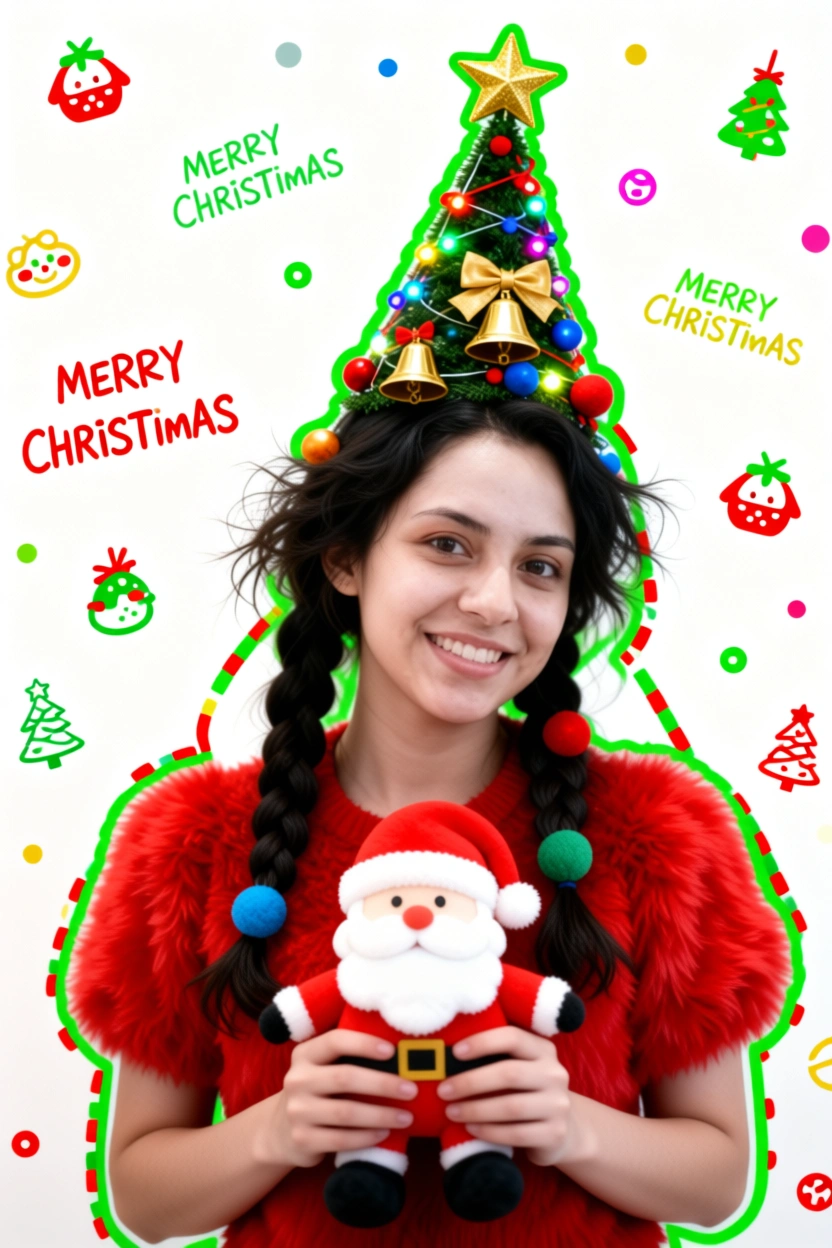
Generate a Christmas-themed image of a beautiful young girl with a "pure desire" (innocent yet alluring) aesthetic. Keep the face consistent with the reference.
Character Appearance & Styling
Hair: Loose, low double-braids decorated with colorful fabric balls. Messy, fluffy strands of hair blend naturally with the headpiece.
Headpiece: A small, neat, cone-shaped Christmas tree fixed to the top of her head. It features a gold star on top and is richly decorated with colorful lights, gold bells, bow knots, and small red, blue, and gold ornaments.
Face & Makeup: Fair "cold-white" skin, smooth as jade. Natural red-brown eyeshadow gradient. An innocent gaze with a dreamy "pure desire" filter.
Clothing: A soft, fluffy red plush top.
Pose & Atmosphere
Action: Holding a Santa Claus plush toy with both hands. She is tilting her head slightly in a playful, cute, and beautiful pose.
Expression: Full of festive celebration; a contrast of cuteness and sexiness.
Vibe: A warm, healing Christmas atmosphere.
Technical & Artistic Style
Photography: Studio soft lighting, 70mm film portrait style. Low contrast, low saturation, delicate film grain, and slight chromatic aberration/glow.
Composition: Medium shot, warm white background, unique but formal composition.
Artistic Elements: * The outline of the character is traced with green graffiti.
The surrounding white space is filled with cute hand-drawn Christmas doodles (collage style).
The silhouette is wrapped in fluorescent red, green, and gold dashed lines and polka dots.
The words "MERRY CHRISTMAS" are written everywhere in a cute font.

Generate a Christmas-themed image of a beautiful young girl with a "pure desire" (innocent yet alluring) aesthetic. Keep the face consistent with the reference. Character Appearance & Styling Hair: Loose, low double-braids decorated with colorful fabric balls. Messy, fluffy strands of hair blend naturally with the headpiece. Headpiece: A small, neat, cone-shaped Christmas tree fixed to the top of her head. It features a gold star on top and is richly decorated with colorful lights, gold bells, bow knots, and small red, blue, and gold ornaments. Face & Makeup: Fair "cold-white" skin, smooth as jade. Natural red-brown eyeshadow gradient. An innocent gaze with a dreamy "pure desire" filter. Clothing: A soft, fluffy red plush top. Pose & Atmosphere Action: Holding a Santa Claus plush toy with both hands. She is tilting her head slightly in a playful, cute, and beautiful pose. Expression: Full of festive celebration; a contrast of cuteness and sexiness. Vibe: A warm, healing Christmas atmosphere. Technical & Artistic Style Photography: Studio soft lighting, 70mm film portrait style. Low contrast, low saturation, delicate film grain, and slight chromatic aberration/glow. Composition: Medium shot, warm white background, unique but formal composition. Artistic Elements: * The outline of the character is traced with green graffiti. The surrounding white space is filled with cute hand-drawn Christmas doodles (collage style). The silhouette is wrapped in fluorescent red, green, and gold dashed lines and polka dots. The words "MERRY CHRISTMAS" are written everywhere in a cute font.

AI filter verwijderen — Filter uit foto halen

Haal fotofilters weg met AI voor een natuurlijker resultaat.

Verwijder filters direct. AI herstelt natuurlijke kleuren, details en originele look.

Before / After Demo

Filtered photo example before AI filter removal

Before: Filtered Image

Natural looking photo example after AI filter remover

After: Natural Image

Wat is een AI Filter Remover?

Online bewerkingstool die AI gebruikt om filters uit foto’s te halen en natuurlijk licht en detail te herstellen. Geschikt voor Instagram-, Snapchat- en selfie-foto’s.

Filters uit foto’s verwijderen

Verminder filtereffecten voor een natuurlijker beeld met deze filter remover.

AI fotofilter verwijderen

AI analyseert kleur- en beauty-aanpassingen en helpt originele tonen te herstellen.

Instagram-filters verwijderen

Zwak social-media-effecten af en herstel natuurlijke kleuren op Instagram-foto’s.

Snapchat-filters verwijderen

Verwerk Snapchat-achtige filters online met AI filter removal workflows.

Zo verwijder je een filter uit een foto

  1. 1.Stap 1 — Upload gefilterde foto

    Upload JPG, PNG of WebP met het filter dat je wilt verwijderen.

  2. 2.Stap 2 — AI analyseert de afbeelding

    Kleur, licht en gestileerde aanpassingen worden beoordeeld.

  3. 3.Stap 3 — Filtereffecten verwijderen

    Genereer een natuurlijker resultaat met minder filter en beauty-effecten.

  4. 4.Stap 4 — Download herstelde foto

    Bekijk voor/na en download de herstelde afbeelding.

Wat kan AI Filter Remover?

Selfie herstellen

Haal filters van selfies af voor een natuurlijker gezicht.

Social media foto’s

Herstel Instagram- en Snapchat-foto’s met AI fotofilter verwijdering.

Oude foto’s

Natuurlijke look bij zwaar bewerkte beelden.

Portretbewerking

Realistischer portretten met picture filter remover.

Voorbeelden van filter-verwijder prompts

Natural Restore

Remove the photo filter and restore natural skin tones and original colors.

Instagram Style

Remove Instagram style filter and restore original lighting.

Natural Look

Make this photo look natural without beauty filters or color grading.

FAQ — AI Filter Remover

Wat is een AI Filter Remover?

+
Gebruikt AI om filters uit foto’s te verwijderen en een natuurlijker uiterlijk te herstellen.

Hoe verwijder ik een filter uit een foto?

+
Upload je foto en laat AI ongewenste filtereffecten analyseren en verminderen.

Kan AI Instagram-filters verwijderen?

+
Ja, veel social-media-effecten kunnen worden afgezwakt voor natuurlijkere kleuren.

Kan ik Snapchat-filters verwijderen?

+
AI-tools kunnen bepaalde Snapchat-achtige effecten verminderen.

Is AI Filter Remover gratis?

+
Beschikbaarheid hangt af van credits en abonnementen op FreeAiWork.

Kan AI originele foto’s herstellen?

+
Kleur en detail verbeteren, maar het resultaat hangt af van het bronbestand.

Gerelateerde AI-beeldtools

Over AI Filter Remover

  • Tool: AI Filter Remover / Photo Filter Remover
  • Powered by image model: nano-banana-2
  • FreeAiWork page updated: 2026-09-16

Verwijder filters uit je foto’s

Upload een gefilterde foto op FreeAiWork en herstel een natuurlijke look met AI Filter Remover.