
Realistic Portrait Prompt
A realistic portrait photo, cinematic lighting, high detail, professional photography.
Z-Image Turbo AI Image Generator
Generate high-quality AI images with Z-Image Turbo, a fast image generation model supporting advanced workflows.
0/2000 characters
Cost: 3 ⚡
Cost: 3 ⚡
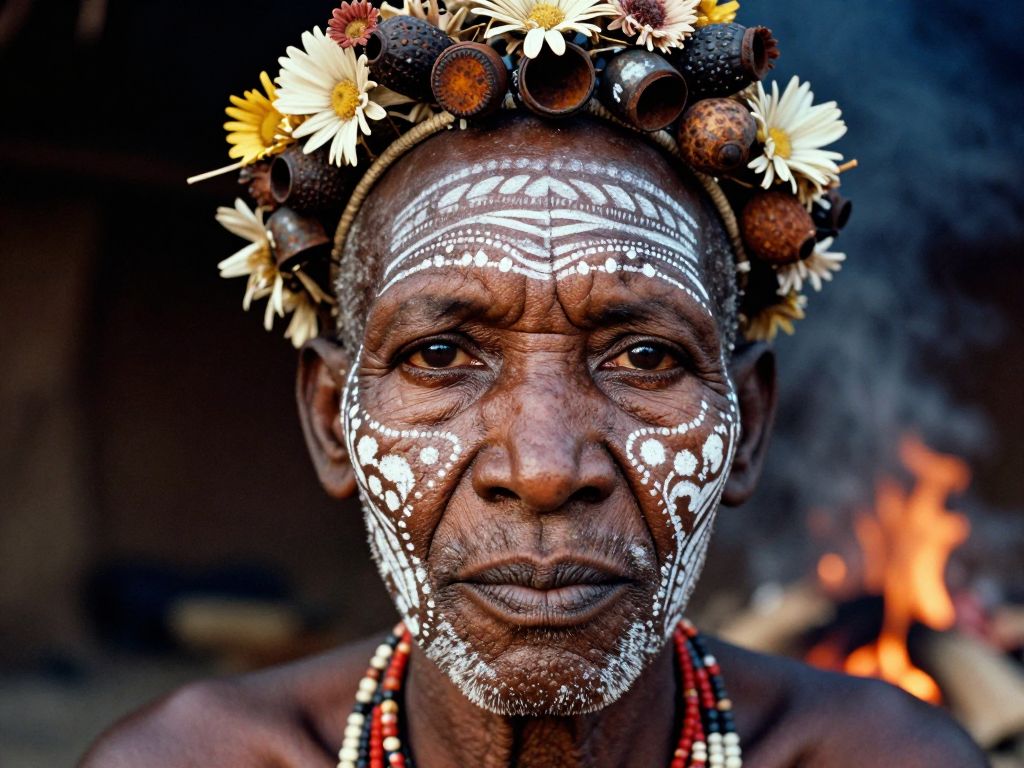
A hyper-realistic, close-up portrait of a tribal elder from the Omo Valley, painted with intricate white chalk patterns and adorned with a headdress made of dried flowers, seed pods, and rusted bottle caps. The focus is razor-sharp on the texture of the skin, showing every pore, wrinkle, and scar that tells a story of survival. The background is a blurred, smoky hut interior, with the warm glow of a cooking fire reflecting in the subject's dark, soulful eyes. Shot on a Leica M6 with Kodak Portra 400 film grain aesthetic.
Generate high-quality AI images with Z-Image Turbo, a fast image generation model supporting advanced workflows.
Z-Image Turbo is a fast AI image generation model designed for creating images from text prompts. It supports efficient inference, open model workflows, ComfyUI integration and advanced customization.
| Feature | Z-Image Turbo |
|---|---|
| Type | AI Image Generator |
| Model Style | Open Model |
| Text To Image | Supported |
| Local Deployment | Supported |
| ComfyUI | Supported |
| LoRA | Supported |
| GGUF | Supported |
| FP8 | Supported |
| BF16 | Supported |
Create detailed AI images from natural language prompts with Z-Image Turbo. Generate portraits, product visuals, illustrations and creative artwork quickly.
Z-Image Turbo is optimized for speed. Use it when you need rapid iteration for concept exploration, prompting tests and high-throughput image generation workflows.
Z-Image Turbo is distributed in multiple precision and packaging formats for different hardware and deployment needs, including BF16, FP8, GGUF and INT8 builds.
| Format | Description |
|---|---|
| BF16 | High quality inference |
| FP8 | Optimized performance |
| GGUF | Local deployment |
| INT8 | Lightweight inference |
Z-Image Turbo can be used with ComfyUI workflows for advanced image generation pipelines. Users can configure models, samplers, prompts and image settings.
A realistic portrait photo, cinematic lighting, high detail, professional photography.

Luxury product photography, studio lighting, commercial style.

Anime character design, high quality illustration, detailed background.
Z-Image Turbo can be customized through LoRA workflows for specialized styles and creative outputs.
Developers can access Z-Image Turbo through compatible AI platforms and APIs. API availability and pricing depend on the provider. FreeAiWork exposes Z-Image Turbo through the existing image generator and credit system.
| Feature | Z-Image Turbo | Flux |
|---|---|---|
| Type | Open image model | Image model family |
| Speed | Fast | Strong |
| Local Use | Supported | Supported |
| ComfyUI | Common | Common |
| Best For | Fast open workflows | Broad creative generation |
| Feature | Z-Image Turbo | Krea 2 |
|---|---|---|
| Type | Image Model | Image Platform |
| Speed | Fast | Fast |
| Local Use | Supported | Limited |
| Open Model | Yes | No |
Generate fast, high-quality AI images with Z-Image Turbo on FreeAiWork — built for open-model and developer-friendly workflows.